GPT-4o is OpenAI's most advanced multimodal AI model, capable of processing text, images, and audio in real-time. If you're wondering how to use GPT-4o to its full potential, this guide covers everything from basic chat to advanced multimodal analysis. GPT-4o represents a significant leap forward in AI capabilities, combining speed, intelligence, and versatility in a single model.
🔧 Tool Introduction: What is GPT-4o?
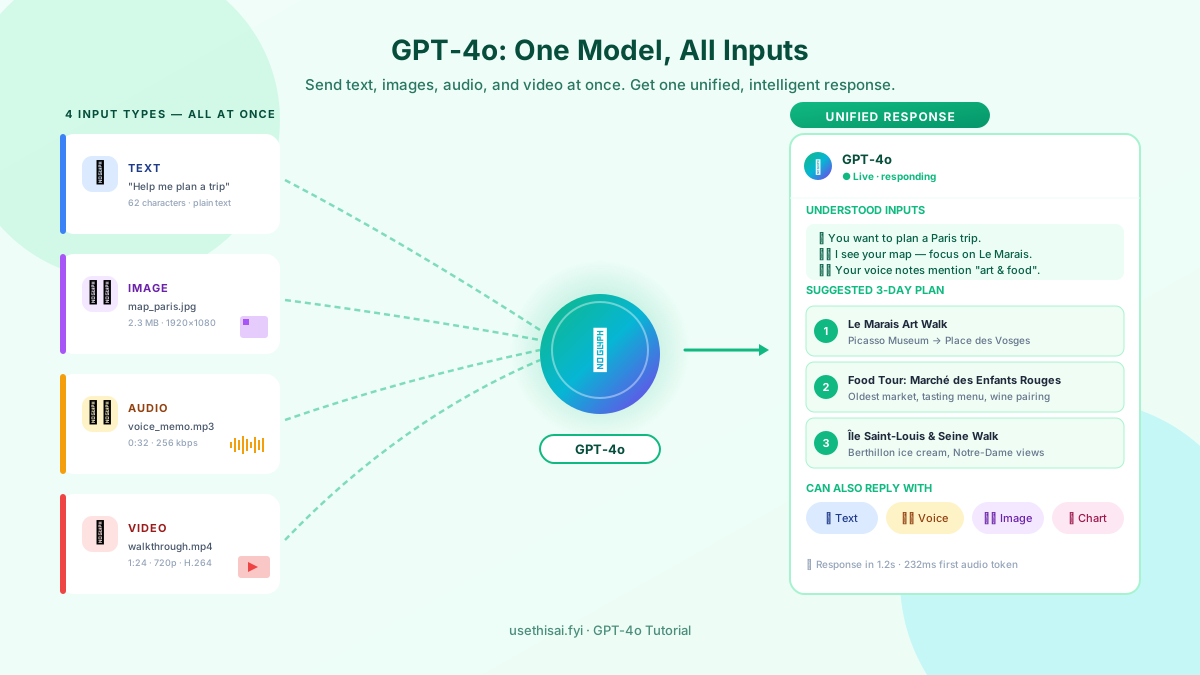
GPT-4o (the "o" stands for "omni") is OpenAI's flagship multimodal model that can understand and generate text, analyze images, process audio, and even see video frames — all within a single unified model. Unlike previous models that required separate systems for different input types, GPT-4o handles everything seamlessly, making it one of the most versatile AI tools available.
GPT-4o is available through ChatGPT (free tier with limits, Plus at $20/month for higher limits) and through OpenAI's API for developers. It powers ChatGPT's most advanced features including vision analysis, voice conversations, data analysis, and custom GPTs. The model is significantly faster than GPT-4 Turbo while maintaining comparable intelligence, making it ideal for real-time applications.
What truly sets GPT-4o apart is its multimodal capability. You can upload a photo of a handwritten note and ask GPT-4o to transcribe and translate it. You can share a screenshot of a bug and get debugging help. You can upload a chart and ask for a detailed analysis. This ability to understand visual information alongside text makes GPT-4o incredibly powerful for real-world tasks.
GPT-4o also introduces real-time voice conversations with natural intonation and emotion, memory that remembers your preferences across sessions, and custom GPTs that you can create for specific tasks. These features transform ChatGPT from a simple chatbot into a comprehensive AI assistant that can adapt to your personal workflow.
📋 5-Step Practical Workflow
Follow this step-by-step workflow to master GPT-4o, from basic setup to advanced multimodal tasks.
Set Up Your ChatGPT Account
Visit chatgpt.com and create a free account. The free tier gives you access to GPT-4o with limited messages. For unlimited access, upgrade to ChatGPT Plus ($20/month) which provides 5x higher message limits, priority access during peak times, and access to advanced features like DALL-E image generation and custom GPTs. Once logged in, select "GPT-4o" from the model dropdown at the top of the chat interface to ensure you're using the latest model.
Master Text-Based Prompting
GPT-4o excels at text-based tasks when given clear, structured prompts. Start with the basics: ask questions, request explanations, or generate content. For better results, provide context and specify the format. Instead of "Explain quantum computing," try "Explain quantum computing to a high school student. Use analogies and keep it under 300 words. Include a simple diagram description." GPT-4o responds well to explicit instructions about tone, length, format, and audience. Experiment with different prompt styles to see what works best for your needs.
Leverage Vision and Image Analysis
This is where GPT-4o truly differentiates itself. Click the paperclip icon (or + button on mobile) to upload an image. You can upload photos, screenshots, PDFs, or even handwritten notes. Once uploaded, ask questions about the image: "What's wrong with this code?" (upload a screenshot), "Translate this menu" (upload a photo), "Analyze this chart" (upload a data visualization), or "Identify this plant" (upload a nature photo). GPT-4o can extract text from images, analyze visual content, and provide detailed descriptions.
Use Voice Conversations and Custom GPTs
On the ChatGPT mobile app, tap the voice icon to start a real-time voice conversation with GPT-4o. The model responds with natural speech, complete with intonation and emotion. This is perfect for brainstorming, language learning, or hands-free assistance. Additionally, explore the GPT Store to find custom GPTs built for specific tasks — there are GPTs for writing, coding, design, research, and more. You can also create your own custom GPT with specific instructions and knowledge base for recurring tasks.
Analyze Data and Generate Visualizations
GPT-4o includes advanced data analysis capabilities. Upload a CSV or Excel file and ask GPT-4o to analyze it: "Find trends in this sales data," "Create a visualization showing monthly growth," or "Identify outliers in this dataset." GPT-4o can write and execute Python code to process your data, generate charts, and provide statistical analysis. This feature effectively gives you a data analyst assistant that can handle everything from simple calculations to complex data modeling.
💡 3 Practical Tips
Tip 1: Use System-Level Instructions for Consistent Output
GPT-4o allows you to set custom instructions that apply across all your conversations. Go to Settings → Custom Instructions and describe yourself and your preferences. For example: "I'm a software developer who prefers concise, technical explanations. Always provide code examples when relevant. Use Python by default unless I specify otherwise." These instructions persist across all chats, ensuring GPT-4o consistently responds in your preferred style. This is one of the most underutilized features that dramatically improves the quality of interactions.
Tip 2: Combine Multiple Input Types in a Single Conversation
GPT-4o's real power emerges when you combine different input types in a single conversation. Start by uploading a document for analysis, then ask follow-up questions via voice, then request a visual summary as a chart. For example: "Here's a PDF of our quarterly report [upload]. Can you summarize the key findings? [GPT-4o responds] Now create a bar chart comparing this quarter to last quarter. [GPT-4o generates a chart] Now explain the chart to me in simple terms via voice." This multimodal workflow is something no other AI model can do as seamlessly.
Tip 3: Use Memory to Build a Personal Knowledge Base
GPT-4o's memory feature remembers important information you share across sessions. Tell GPT-4o things like "Remember that I prefer vegan recipes" or "Remember that I'm working on a React project called TaskManager" or "Remember my coffee preference: oat milk latte, no sugar." Over time, GPT-4o builds a profile of your preferences and context, making each interaction more personalized and efficient. You can view, edit, or delete specific memories at any time in Settings → Personalization → Memory.
❓ FAQ
What does GPT-4o mean?
GPT-4o stands for "GPT-4 omni" — a multimodal model that can process text, images, and audio simultaneously. Unlike previous models that handled each input type separately, GPT-4o uses a single neural network to understand and generate across all modalities, resulting in faster responses and better contextual understanding.
Is GPT-4o free?
GPT-4o is available to free ChatGPT users with limited messages (approximately 10-20 messages every few hours depending on demand). ChatGPT Plus ($20/month) provides significantly higher usage limits, priority access during peak times, and access to additional features like DALL-E image generation, custom GPTs, and advanced data analysis.
Can GPT-4o see images?
Yes, GPT-4o is multimodal and can analyze images, screenshots, documents, and even video frames. You can upload images and ask questions about their content, extract text from photos, analyze charts and graphs, identify objects, and much more. This vision capability is available on both the free and Plus tiers.
What is the difference between GPT-4o and GPT-4 Turbo?
GPT-4o is faster, more efficient, and natively multimodal compared to GPT-4 Turbo. It processes text, images, and audio in a single model rather than routing between separate systems. GPT-4o also has a larger context window (128K tokens), better performance on non-English languages, and significantly lower latency for real-time applications.
Can GPT-4o browse the internet?
Yes, GPT-4o can browse the internet when the web search feature is enabled (available on the Plus plan). This allows it to access current information, verify facts, and research topics beyond its training data cutoff. Simply enable the "Search" toggle in the ChatGPT interface before asking your question.
🔗 You May Also Need (你可能还需要)
掌握了 GPT-4o 的多模态能力后,你可能还需要这些工具来完善你的 AI 工作流:
- 🎨 How to Use MidJourney — 用 GPT-4o 生成创意概念,用 MidJourney 实现视觉呈现
- 🤖 How to Use Claude — 当需要处理超长文档(200K tokens)时,Claude 是 GPT-4o 的绝佳补充
- 👨💻 How to Use Devin — 用 GPT-4o 做代码审查和优化建议,Devin 负责自动化编码执行