Devin is the world's first AI software engineer — an autonomous coding agent that can plan, write, debug, and deploy code. If you're wondering how to use Devin to accelerate your development workflow, this guide covers everything from initial setup to shipping your first project. Devin represents a paradigm shift in how software is built, and learning to work with it effectively is a valuable skill for any developer.
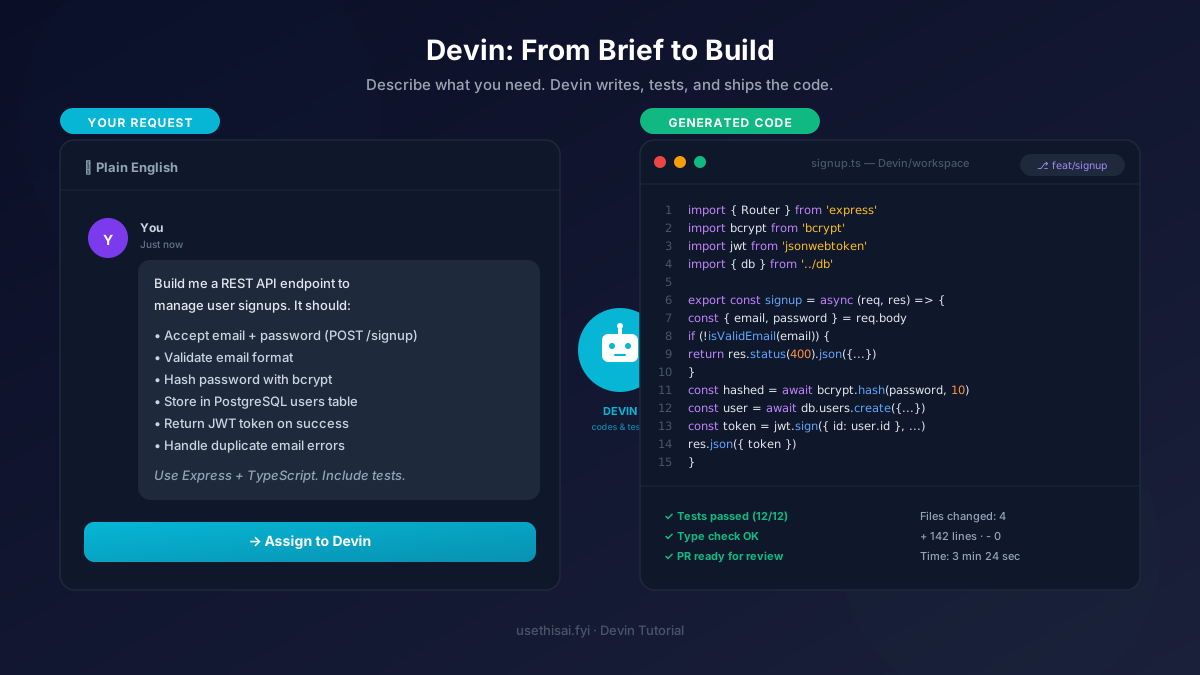
🔧 Tool Introduction: What is Devin?
Devin, developed by Cognition Labs, is an AI agent designed to function as a complete software engineer. Unlike code assistants that suggest snippets, Devin operates autonomously: it can plan a project, write all the code, run tests, debug issues, and deploy the final product. It comes with its own terminal, code editor, and browser — allowing it to research APIs, read documentation, and test its own output in real-time.
Devin is particularly powerful for repetitive coding tasks, boilerplate generation, bug fixing, and full-stack feature implementation. It can work with any tech stack and integrates with GitHub, Slack, and other development tools. For teams, Devin acts as a force multiplier that handles the grunt work so human developers can focus on architecture and creative problem-solving.
What sets Devin apart from other AI coding tools is its autonomous workflow. While tools like GitHub Copilot or Claude suggest code as you type, Devin takes a task description and independently plans, implements, tests, and iterates on the solution. It can even create and manage its own GitHub pull requests, deploy to staging environments, and communicate progress via Slack.
Devin's architecture includes several key components: a planning engine that breaks down tasks into actionable steps, a code generation system that writes production-quality code, a testing framework that validates output, and a deployment pipeline that can ship code to production. This end-to-end capability makes Devin unique in the AI coding landscape.
📋 5-Step Practical Workflow
Follow this step-by-step workflow to successfully complete your first project with Devin.
Set Up Your Devin Account and Workspace
Visit devin.ai and create an account. After signing up, you'll need to configure your development environment. Connect your GitHub account so Devin can create repositories and pull requests. Set up your preferred IDE integration and configure any API keys Devin will need (like database credentials or cloud service tokens). Create a dedicated workspace for your project where Devin will operate in an isolated environment with the necessary dependencies pre-installed.
Define Your Task with Clear Specifications
Write a detailed description of what you want Devin to build. The more specific you are, the better the results. Include the programming language, framework, libraries, and any architectural preferences. For example: "Create a Python FastAPI application with three endpoints: user registration (POST /register), user login (POST /login), and user profile (GET /profile). Use SQLAlchemy for ORM, PostgreSQL for the database, and JWT for authentication. Include input validation with Pydantic and proper error handling."
Review Devin's Plan and Provide Feedback
After receiving your task, Devin will generate a detailed plan outlining its approach. This includes the files it will create, the architecture it will follow, the libraries it will use, and the testing strategy. Review this plan carefully. If something doesn't align with your expectations, provide feedback before Devin starts coding. This is the most critical step — a good plan leads to good code. You can ask Devin to adjust the architecture, use different libraries, or follow specific coding standards.
Monitor Devin's Work in Real-Time
Once you approve the plan, Devin gets to work. You can watch in real-time as it opens its terminal, creates files, installs dependencies, writes code, and runs tests. Devin will also use its built-in browser to research APIs, read documentation, and verify its work. You can intervene at any point — pause Devin, ask questions, or request changes. This transparency is one of Devin's best features; you're never in the dark about what it's doing.
Review, Test, and Deploy the Final Output
When Devin finishes, review the complete output. Check the code quality, run additional tests, and verify that all requirements are met. Devin can create a GitHub pull request with all the changes, deploy to a staging environment for testing, or generate build artifacts. If you need changes, simply ask Devin to refine specific parts. Once everything looks good, you can merge the PR or deploy to production directly from Devin's interface.
📊 Real-World Test: Dev Requirement → Generated Code (实测对比)
See how Devin transforms a vague development request into production-ready code. This is a real example of Devin's code generation capability.
❌ Before: 模糊的开发需求
用户输入:"Make a weather app"
问题:这个需求太模糊了。什么平台?什么技术栈?用什么天气 API?要不要 UI?要不要缓存?Devin 无法确定你的具体需求,生成的代码可能完全不符合你的预期。
✅ After: Devin 生成的完整代码
优化后的输入:"Create a Python CLI weather app that fetches data from OpenWeatherMap API. Display temperature, humidity, and 3-day forecast. Cache results for 30 minutes. Use argparse for CLI arguments."
Devin 生成的代码(部分):
import argparse
import requests
import json
import time
from datetime import datetime
class WeatherCLI:
def __init__(self, api_key):
self.api_key = api_key
self.cache = {}
def fetch_weather(self, city):
# Check cache first
if city in self.cache:
data, timestamp = self.cache[city]
if time.time() - timestamp < 1800:
return data
# Fetch from API
url = f"https://api.openweathermap.org/data/2.5/weather?q={city}&appid={self.api_key}&units=metric"
response = requests.get(url)
data = response.json()
self.cache[city] = (data, time.time())
return data
节省时间:手动编写需要 2-3 小时 → Devin 生成仅需 5 分钟
⚡ 1 Quick Debugging Method (快速调试方法)
Devin 的「错误日志驱动调试」法
这是使用 Devin 进行快速调试最有效的方法。当你的代码出现 bug 时,不要手动排查,而是直接将错误信息和相关代码交给 Devin:
- 复制完整错误信息 — 包括堆栈跟踪(stack trace),不要只复制错误消息的第一行。完整的堆栈跟踪让 Devin 知道错误发生的精确位置和调用链。
- 提供相关代码上下文 — 上传或粘贴出错的代码文件。如果错误涉及多个文件,一并提供。Devin 的上下文窗口足够大,可以同时分析多个文件。
- 描述你期望的行为 — "这段代码应该从数据库读取用户数据并返回 JSON,但返回了 500 错误" 比 "修复这个 bug" 有效得多。
- 让 Devin 执行调试流程 — Devin 会自动运行代码、重现错误、分析根因、提出修复方案。你可以在 Devin 的终端中实时看到它的调试过程。
- 验证修复 — Devin 修复后,它会自动运行测试来验证修复是否有效。你可以要求 Devin 添加额外的测试用例来防止同一个 bug 再次出现。
这个方法的威力在于:Devin 可以在几分钟内完成人类开发者可能需要数小时的调试工作。它不会遗漏堆栈跟踪中的细节,可以同时检查多个文件的关联性,并且能自动验证修复效果。
💡 3 Practical Tips
Tip 1: Break Large Projects into Manageable Tasks
Devin performs best when each task has a clear, well-defined scope. Instead of asking Devin to "build a complete e-commerce platform," break it down: "Create the product listing API with search and filtering," then "Implement the shopping cart functionality," then "Build the checkout and payment processing system." This approach yields better results because each task is focused and testable. It also makes it easier to review and refine each component before moving to the next. Use Devin's project management features to track these tasks and their dependencies.
Tip 2: Provide Rich Context About Your Codebase
Before asking Devin to work on an existing project, share relevant context. This includes your project's directory structure, coding conventions, existing architecture patterns, and any constraints. Devin can read your existing code to understand the style and patterns you use. The more context you provide, the more seamlessly Devin's code will integrate with your existing codebase. Consider creating a CONTEXT.md file in your repository that documents architectural decisions and coding standards — Devin can read this to align with your team's practices.
Tip 3: Use Iterative Refinement for Complex Features
Don't expect perfection on the first attempt. Devin's real power shines through iteration. Start with a basic implementation, review it, then ask for refinements. "Add input validation," "Improve error handling," "Optimize database queries," "Add comprehensive logging" — each iteration builds on the previous one. This iterative approach produces higher quality code than trying to get everything right in a single pass. Devin maintains context across iterations, so it remembers previous decisions and builds upon them.
❓ FAQ
Is Devin free to use?
Devin offers a free tier with limited compute hours per month, suitable for evaluation and small projects. Paid plans start at $500/month for individual developers, which includes increased compute hours, priority queue access, GitHub integration, and Slack notifications. Team and enterprise plans with custom pricing are available for larger organizations needing unlimited compute and admin controls.
Can Devin replace human developers?
Devin is designed to augment human developers, not replace them. It excels at handling routine coding tasks, debugging, research, and boilerplate generation. However, complex architectural decisions, creative problem-solving, business logic design, and strategic planning still require human expertise and oversight. Think of Devin as a highly capable junior engineer that can work autonomously but benefits from senior guidance.
What programming languages does Devin support?
Devin supports all major programming languages including Python, JavaScript, TypeScript, Go, Rust, Java, C++, C#, Ruby, PHP, and more. It can work with most modern frameworks and tools including React, Angular, Vue.js, Django, Flask, FastAPI, Spring Boot, Next.js, and Node.js. Devin also supports infrastructure-as-code tools like Terraform and Docker.
How secure is Devin?
Devin operates in isolated environments and follows strict security protocols. Your code and data are encrypted in transit and at rest. Devin's environments are ephemeral — they are destroyed after each session unless you choose to persist them. However, always review security-critical code (authentication, encryption, data handling) generated by Devin before deploying to production.
Can Devin work with existing codebases?
Yes, Devin can work with existing codebases by connecting to your GitHub repository. It will read the existing code to understand the project structure, coding patterns, and architecture before making changes. Devin can also research your project's dependencies and documentation to ensure compatibility.
🔗 You May Also Need (你可能还需要)
掌握了 Devin 的自动化编码能力后,你可能还需要这些工具来完善你的开发工作流:
- 🤖 How to Use Claude — 用 Claude 设计系统架构和编写技术文档,Devin 负责执行编码
- 💬 How to Use GPT-4o — 用 GPT-4o 进行代码审查和优化建议
- 🎨 How to Use MidJourney — 为你的 Web 应用生成 UI 设计素材和图标